Video translator with a predictable result you can trust


Translate videos with top-accuracy dubbing in 135+ languages, with the speaker's cloned voice, precise lip-sync and full control over the text, sound, and identity.
EN flag
En
FR flag
Fr
DE flag
De
PT flag
Pt
ES flag
Es
Pro translation options
Voice cloning
Clone your speaker's voice
Translation dictionary
Lock key terms
Translation Prompting
Guide AI with context
Team spaces
Collaborate across teams
AI script adjustment
Auto-adapt scripts
Lipsync
Synchronize voice with lip movements
Captions
Generate accurate on-screen subtitles
Free 7-day trial. No credit card required.
Political, inappropriate and discriminatory content will be rejected. Terms & Conditions apply.
Processing your video.
Please wait to be redirected.
Oops! Something went wrong while submitting the form.
Over 4,000,000 happy users
How it works

How to translate a video

The whole workflow runs in your browser, with editable transcripts before export and nothing to install or configure. Upload, translate, edit what needs it, add subtitles, and export the finished video - or the transcript as SRT or TXT.
For volume, the same engine is available through the API.
step 1

Upload your video or paste a link

Upload your video directly or with a YouTube / Google Drive link. Whether it is a video file or an audio file, all possible formats are available.
step 2

Choose your languages and settings

Pick source and target languages, then choose the voice: voice cloning or one of our AI voice presets. Optionally: turn lip-sync on or off, lock key terms with a glossary and present a full context with prompting.
step 3

Review, then export every language at once

Preview the result and fix what needs it. Rask flags the lines worth a second look, so you're not scrubbing the timeline. Then translate into every remaining language in one click, add auto-generated subtitles and download the video.
Use cases

Who uses Rask Video Translator

01 / 05 · Learning and development

Learning and development

Onboarding courses, compliance training, product enablement, safety briefings, and internal updates. Translate only the modules that changed instead of rebuilding the whole library, and keep the same trainer’s voice in every market.
02 / 05 · Customer education and product content

Customer education and product content

Help videos, feature walkthroughs, onboarding flows, webinars, and release notes. Ship them in your customers’ languages the same day as the original version, without waiting on a vendor for each release.
03 / 05 · Marketing and demand generation

Marketing and demand generation

Campaign videos, product demos, case studies, event recordings, and social cuts. One shoot covers every market, and the presenter your audience already knows stays recognizable in each version.
04 / 05 · Religious and community broadcast

Religious and community broadcast

Sermons, services, study sessions, and podcast feeds. Long-form content on a weekly schedule, translated into every language the congregation speaks, in the same trusted voice each week.
05 / 05 · Creators and podcasters

Creators and podcasters

Episodes, interviews, tutorials, and the whole back catalogue. Translating an archive costs a fraction of re-recording it, and you keep the voice that built the following.

Why Choose Rask for Accurate Video Translation

01

Full control over the translation

Edit text line by line to improve translation accuracy, then regenerate the dubbing for just that segment with review and editing. Merge, split, or delete clips, revert to the original audio where a section shouldn't be translated at all, and adjust pauses, pronunciation, or delivery where it matters. Which is how teams push AI video localization toward the highest possible accuracy.
02

Native expressiveness and accent adjustment

Expressiveness controls how much emotion carries into the new language. Similarity and accent control how closely the output matches the original speaker. Turn similarity down when you want the delivery without the identity, which matters for rights-sensitive content.
03

Video translation with lip-sync

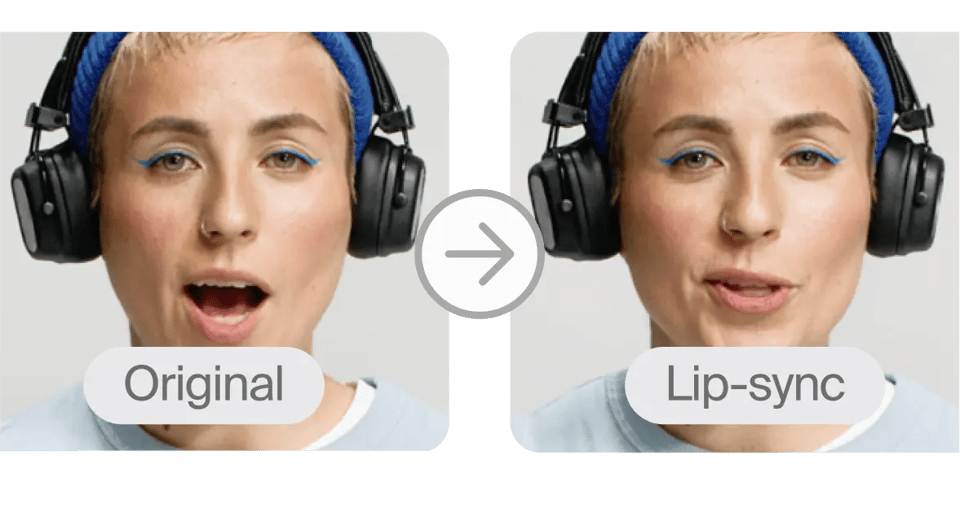
When the speaker is on camera, mismatched mouth movements are what an audience notices first, even when the translation itself is good. Rask syncs lip movement to the translated audio across 135+ languages, so the localized version carries the speaker's presence.
04

Context through prompting

Describe the speaker, the setting, and what the video is for. Rask uses that to make translation decisions a word-level tool can't: register, formality, how a term should land for this audience rather than in general.
05

Speaker and background separation

Rask separates up to 10 speakers automatically and assigns each one their own voice, so a panel or interview doesn't collapse into a single narrator. Background audio stays where it belongs.

Everything You Need in an AI Video Translator

135+ languages and dialects

English Español Français 中文 हिन्दी
Translate into 135+ languages, and choose the regional locale within them. Spanish covers Spain and Latin America, Arabic covers 16 different countries, while English covers 14 dialects & accents. The translation follows the spelling and grammar of the region you pick.

Voice cloning and AI voices

VoiceClone
Communicate with your audience in your own voice in 32 languages
Voice cloning carries the speaker's voice into 32 languages, with Expressiveness, Similarity and Accent as separate dials that control how much emotion carries over and how close the output stays to the original person. AI dubbing helps preserve speaking style and improves engagement, while translated speech sounds more natural. No source voice to clone? Choose from an AI voice library for voice over, with usage rights included.

Lip-Sync

Mouth movements match the translated audio, so the result reads as speech rather than a voiceover laid on top. It holds up on the content where it matters most: presenter-led video, courses, interviews, anything where the speaker is on camera and the face carries the performance.

Editor with flagged segments

Editor with flagged segments
Rask marks the segments most likely to need a second look, so you review the three lines that matter instead of the whole timeline. Fix the text, regenerate just that segment, and move on. Edits don't cost extra minutes.

YouTube video translation

YouTube video translation
Paste a YouTube or Google Drive link, or upload the file directly. Export the dubbed track to create a translated video for global audiences, then add it to your channel as a multi-language audio track so one video serves every market from a single URL.

Translate & download subtitles

Generate automatic subtitles in the target language, making subtitle translation fast and accurate for multilingual audiences, or upload your own SRT to preserve the original subtitles and lock the translated subtitles to wording you've already approved. Download subtitles separately and reuse them wherever the video ends up.
Enterprise ready

Video Translation for Enterprises

Built for teams handling video at scale
Everything your legal, security, and ops teams need before a growing video library or sensitive internal content goes through translation.

Security and compliance

Rask is SOC 2 Type II certified and GDPR compliant, so a security review of how video and audio data is stored and processed doesn't stall the rollout.

API access

Translate a backlog, a growing archive, or a recurring release schedule, without uploading files one at a time through the browser.

Reviewer roles

Someone who actually knows the target language signs off on the output before it ships, without becoming the bottleneck for every other language.

Custom development

Dedicated engineering support for teams integrating translation into existing infrastructure, plus a Customer Success Manager with scheduled health checks.

Human in the loop

An expert ear on the output before it ships, catching a mispronunciation, a pacing issue, or a voice that's drifted from the original speaker.

Built on trust

In some countries a voice counts as part of someone's identity. Rask supports both a consented clone of a real voice and a neutral synthetic voice with no identity attached, so you publish with the right one for the content.
Advanced tools

Advanced Features Enhancing Your Video Translation Experience

Want to learn more about our features? Contact sales.
01

AI Translation with Unmatched Accuracy

Rask leverages the best AI video translator technology to deliver highly accurate translation results. This ensures your translated text reflects the original language's meaning and tone perfectly, breaking down language barriers effectively. The same accuracy carries into AI dubbing, so the spoken translation matches the meaning and authenticity of the original.
02

Seamless Video Upload and Download Options

Upload your videos & audios effortlessly in various formats and sizes with our accessible online interface: MP4, MOV, WEBM, MKV, MP3, WAV. After translation and editing, use the convenient download button to export your translated videos or subtitles quickly, supporting different formats to fit your workflow.
03

Transcribe Videos and Generate Bilingual Subtitles

Our AI-powered transcription tools transcribe videos automatically, enabling you to create bilingual subtitles that display both the original language and translated text simultaneously on screen. This feature enhances accessibility and engagement for viewers worldwide.
04

Support for Short Videos and Training Videos

Whether you’re working with short videos for social media or detailed training videos, our platform adapts to your needs. Add subtitles and translations quickly to maximize global reach and ensure your product videos and educational content resonate with diverse audiences. Free trial users can run short videos through the full dubbing workflow before choosing a plan.
05

Powered by Cutting-Edge Video AI

Utilizing advanced video AI, our platform automates the entire localization workflow: from transcribing videos and AI translation to dubbing and subtitle export review. Fine tune your translations and subtitle timing with intuitive tools designed to streamline your production process. Voice cloning runs inside the same pipeline, so dubbing keeps the original speaker's voice across every language.
06

Accessible Online Platform for All Your Needs

Our platform is accessible online from any device, requiring no additional downloads or installations. This makes it easy to manage your video translation projects anywhere, anytime, with full control over subtitle editor features and export options. Start free, with no download and no credit card.

“Localize content at scale with Rask API”

Need to translate hours of audio and video daily? The robust API automates the process, making it time- and cost-efficient.
Review image
Veronica R.
Mentor, Enterprise
Education

“Adding voices to videos has never been easier”

The platform is very user-friendly. It makes my work much easier and saves me a lot of time.
Review image
Steven R.
Senior Software Engineer
Marketing

“A great way to reach new audiences in other countries”

What I like best is the intuitive interface — incredibly user-friendly. The data processing speed is phenomenal, and the support team is responsive and very helpful.
Review image
Nadia S.
Deputy Director, Small-business
Entertainment

“Probably the best AI voice cloning and dubbing tool on the market”

Very easy to upload voice or video files, with an interface where both the original and the translation can be edited. The clone voices are quite good — in totality, a top tool right now.
Review image
Bent D.
Board Member, Enterprise
Content Creators
Languages

Video Translator by Language

Translate audio into English from 40+ source languages - pick a language pair to get started.
FAQ

Questions,
answered

Can't find what you're looking for? Contact sales.

How do I translate a video?

Is this a free AI video translator?

Can I translate a YouTube video?

How accurate is AI video translation?

What languages can I translate videos into?

Can I translate a video into multiple languages at once?

How do I change the language of a video?

Can I translate a standalone audio file?

How do I translate a video with lip sync?

What video formats and file sizes can I upload?

Is there an app that can translate a video?

Translate your first video free

7 days, no credit card. Try it on real content: a course module, a campaign video, a recorded session. Hear the cloned voice before you decide.